
Switching Viking Rise accounts on one emulator
Every instance is a full Android VM, so the cheapest way to add accounts isn't more instances — it's more characters per instance. This action is what makes that work unattended.
This guide assumes you've completed Viking Rise bot setup.
Turning it on is not enough. Enter the ID to switch to. Without it the action has no target and does nothing.
What the action does
You add it to an account's action list like any other action. When the bot reaches it, it switches and then carries on with the rest of the list as the new character.
The game restarts itself after either kind of switch. That's normal — the bot waits it out and gets back to the city before moving on.
Put it at the top of the action list
This action belongs first, above everything else the account does.
The bot works down the list in the order you arranged it, and Account Switch is what decides who the rest of that list runs as. Anything sitting above it runs as whoever the emulator was already on — which, on an emulator shared by two accounts, is the other account's character. The work still happens; it just happens on the wrong person, and nothing about that looks like a failure in the activity feed.
Account Credentials is pinned to the very top and can't be moved, so in practice Account Switch goes directly underneath it. Drag it there once and the rest of the list follows behind.
If you want the emulator to move twice in one cycle, add a second copy further down — Account Switch clones like every other action. The first switch still belongs at the top.
The two modes
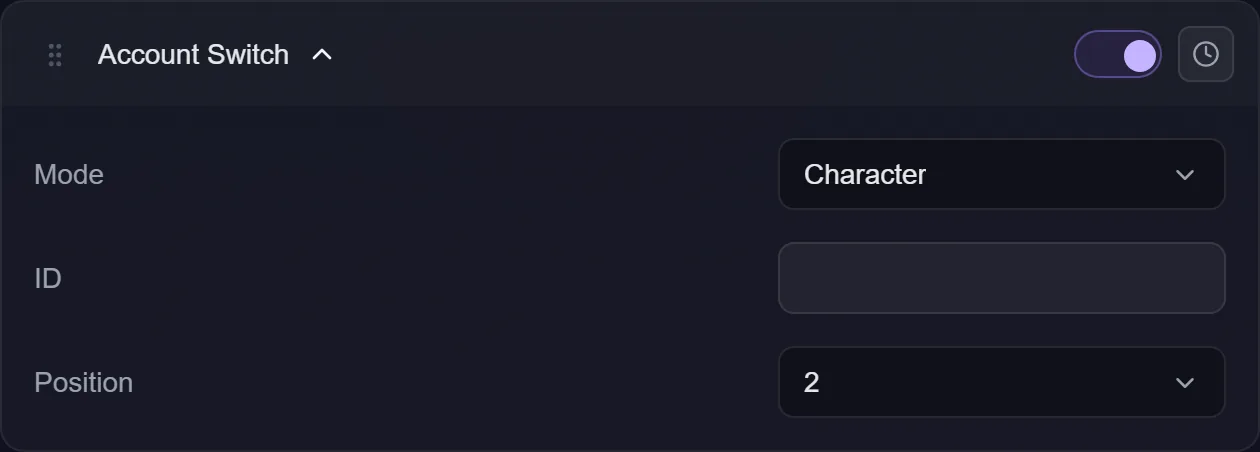
Character switches between the characters belonging to the login already signed in on that emulator — the same list the game shows under Settings ▸ Manage Characters. You pick a Position (1 to 4, reading across the grid: top-left, top-right, bottom-left, bottom-right) and the bot taps that card.
IGG switches the logged-in account itself. You give it an ID — the numeric IGG ID of the account you want — and the bot goes through Settings ▸ Account ▸ Switch Account to get there.
Change email
This option only appears in IGG mode.
Leave it unticked and the switch stays inside the login already on the emulator: the bot keeps that session and picks your ID out of that email's list of characters. That's the right setting when all the characters you rotate through sit under one IGG email.
Tick it and the bot signs out of that login first, signs in with the email and password saved on this account, then picks your ID out of that email's list. Use it when the account you want lives under a completely different email.
The email doesn't come from here. It comes from the account's Account Credentials. That's deliberate: one account has one login, and keeping a second copy of the email and password next to every Account Switch clone is how they end up disagreeing after a password change. The ID stays here, because the ID is the thing you're switching to.
So a working change-email setup needs two things filled in:
- Account Credentials — the IGG email and password.
- Account Switch — mode IGG, the target ID, and Change email ticked.
Troubleshooting
It skipped the action and told me to add credentials. You ticked Change email but the account has no email or password saved. The bot doesn't open anything, leaves the emulator where it was, and the rest of the account's actions run as normal.
No email saved and Change email unticked. That's fine. An in-login switch doesn't need one — it's using the session already signed in.
The account parked saying to check the ID. The bot scrolled the whole list and your ID genuinely wasn't in it. That's a typo guard: a wrong ID will never appear on a later attempt, so retrying forever would just burn the account's time.
Nothing happened and no error. The ID you asked for was already the one signed in. The game says so, the bot takes that as "nothing to do", and moves on — no restart, no error.
The switch failed half-way. The bot retries from the city view, and if that still doesn't work it relaunches the game once and tries the action one more time. If it fails again it gives up for this cycle and moves on — it never gets stuck repeating it.
Everything ran, but on the wrong character. The action is too far down the list. Everything above it ran as whoever the emulator was on before — drag it up under Account Credentials. This is the most common way to get Account Switch wrong, precisely because it doesn't produce an error.
I want it to move more than once per cycle. You can. Account Switch clones like any other action, so add several with different IDs — one at the top, then another further down after the actions the first character should do.