
Storing Viking Rise account credentials
Most cycles never touch these. That's exactly why people leave them blank — and why the first time an account gets kicked, it stops dead until somebody notices.
This guide assumes you've completed Viking Rise bot setup.
Fill this in even if the account is already logged in. It's what the bot signs back in with, and an account that gets logged out with nothing saved here stops until you fix it by hand.
What it is
Credentials isn't an action that "runs" the way the others do. It has no on/off toggle and no schedule, because it's never queued — it's the login the bot falls back on whenever an account needs signing in.
It sits pinned at the top of every account's action list and can't be dragged or cloned.
Setting it up
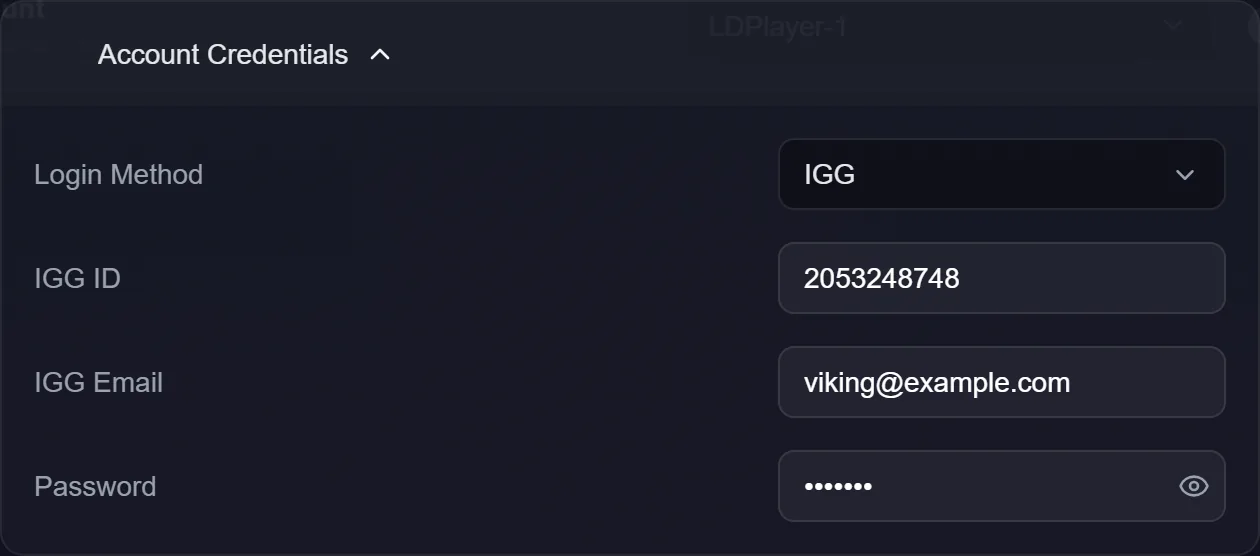
Login Method is IGG or Google. For IGG logins, fill in:
- IGG ID — the numeric account id. This is what identifies the character.
- IGG Email — the email the login uses.
- Password — the password for that email.
Each account has its own Credentials entry. They're per account by design, since the IGG ID is what tells two characters apart.
When the bot actually uses them
Most cycles never do. The game keeps you logged in, and the bot simply finds the account already signed in when the emulator boots.
They matter when:
- the emulator has been rebuilt and the game has no session;
- someone logged into the account elsewhere and the game kicked this session out;
- Account Switch is set to change email, which signs in as the saved login before picking a character.
They're shared across profiles
If you use action profiles, credentials are not part of a profile. Switching profiles keeps the same login, because one account has one login — a per-profile copy would go stale the first time you changed the password.
For the same reason they're deliberately left out of bulk copies by default. Copying somebody else's login onto twenty accounts is almost never what you want.
Troubleshooting
The account parked saying credentials are missing. It was logged out and had nothing to sign in with. Nothing is guessed — fill these in and it resumes.
The password is wrong. The login form stays up, the bot notices it didn't get through, and the account is parked rather than retried forever.
I changed the password in the game. Update it here too; nothing detects the change automatically.
I use Google login. Pick Google as the method. The IGG fields aren't used for signing in.