
Training troops automatically in Viking Rise
Training is the action most people leave running forever and configure once. Getting that one configuration right is the whole job — and the most common way to get it wrong is to turn the action on and change nothing else.
This guide assumes you've completed Viking Rise bot setup and have an account running.
Turning it on is not enough. Every tier starts on None with no Upgrade box ticked, and in that state the action runs every cycle and trains nothing at all. Set a tier, or tick an Upgrade box, before you walk away from it.
What the action does
One pass visits each barracks in turn. For each troop type it opens the training panel, picks the tier you asked for, maxes the quantity slider and starts the batch. If you also ticked Upgrade for that type, it promotes your lowest-tier troops of that kind before moving on.
A barracks that is already busy is skipped — unless you allowed speed-ups, in which case the bot spends them on the running timer instead of walking away.
Setting it up
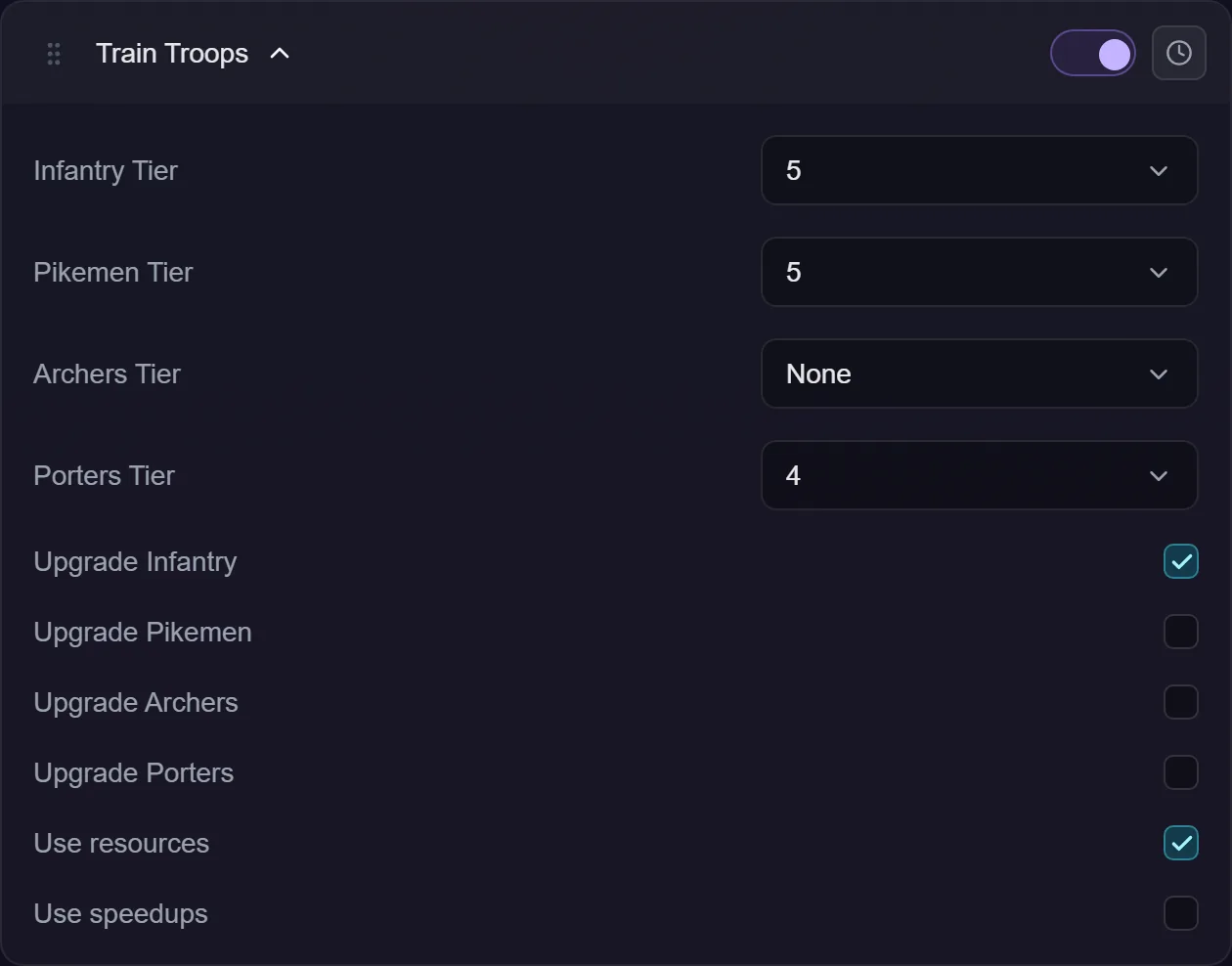
There are four troop types — Infantry, Pikemen, Archers and Porters — and each gets its own tier dropdown and its own Upgrade checkbox. They don't interact: you can train Infantry and only promote Porters, if that's what the account needs.
Tier is 1 to 7, or None. None means the bot doesn't train that type at all, which is how you keep the action enabled without it touching every barracks on the account.
The tier you pick is a ceiling rather than a promise. The game gates high tiers behind building levels, so asking for tier 7 on an account that has only unlocked tier 5 trains tier 5. It doesn't fail and it doesn't skip the barracks.
Promoting what you already have
Upgrade promotes your lowest trained tier of that type upward. Where it stops depends on whether you also set a tier:
- With a tier set, promotion stops one below it. Ask to train tier 5 and promotion moves tier 1–4 troops up to 5, and no further.
- With the tier on None, promotion is unbounded and runs to the highest tier your account has unlocked.
That bound is the point, not a limitation. Promoting tier 5 turns it into tier 6 — so without the cap, an account set to train tier 5 with Upgrade ticked would promote away the very tier it was told to build, every cycle, forever.
Spending your inventory
Both of these are off by default, because both spend things you own.
Use resources lets the bot top up from your inventory when a batch is short of resources. With it off, a batch you can't afford simply isn't started.
Use speedups lets it spend speed-up items on a training timer. It applies in two places: after starting a batch, and when it finds a barracks that was already training when the pass began.
Scheduling
Like every action, training can be gated to particular days or a time window — see action schedules. Left alone, it's always eligible.
Most people don't schedule training. It's cheap when there's nothing to do and the barracks are the bottleneck anyway, so running it every cycle costs almost nothing. Scheduling earns its keep when you want a different tier at different times — add a second copy of the action with its own tier and its own window.
Troubleshooting
Nothing is ever trained. Almost always the tiers are all on None with no Upgrade ticked. The activity log will say the action had nothing to do.
It trains a lower tier than I asked for. Your account hasn't unlocked the tier you picked. Raise the barracks.
A barracks is skipped every pass. It's already training. Tick Use speedups if you'd rather the bot shortened that timer than waited for it.
It trains but never promotes. Check the Upgrade box for that specific troop type — it's per type, not one switch for the action.
My tier 5s keep disappearing. You have Upgrade ticked with the tier on None, so promotion is running unbounded. Set the tier and promotion will stop one below it.