
Automating building upgrades in Viking Rise
Your account has two builders. That single fact shapes everything about this action: it is a priority list, not a queue, and only the top two picks are ever attempted in a pass.
This guide assumes you've completed Viking Rise bot setup.
Turning it on is not enough. With no targeted building and nothing ticked, the action has no target and does nothing at all.
What the action does
It picks a building and upgrades it. If that building needs something else raised first, the bot follows the chain the game itself offers — the Go button on the upgrade window — and starts whichever upgrade it can actually reach. So asking for something expensive still makes progress rather than stalling.
Setting it up
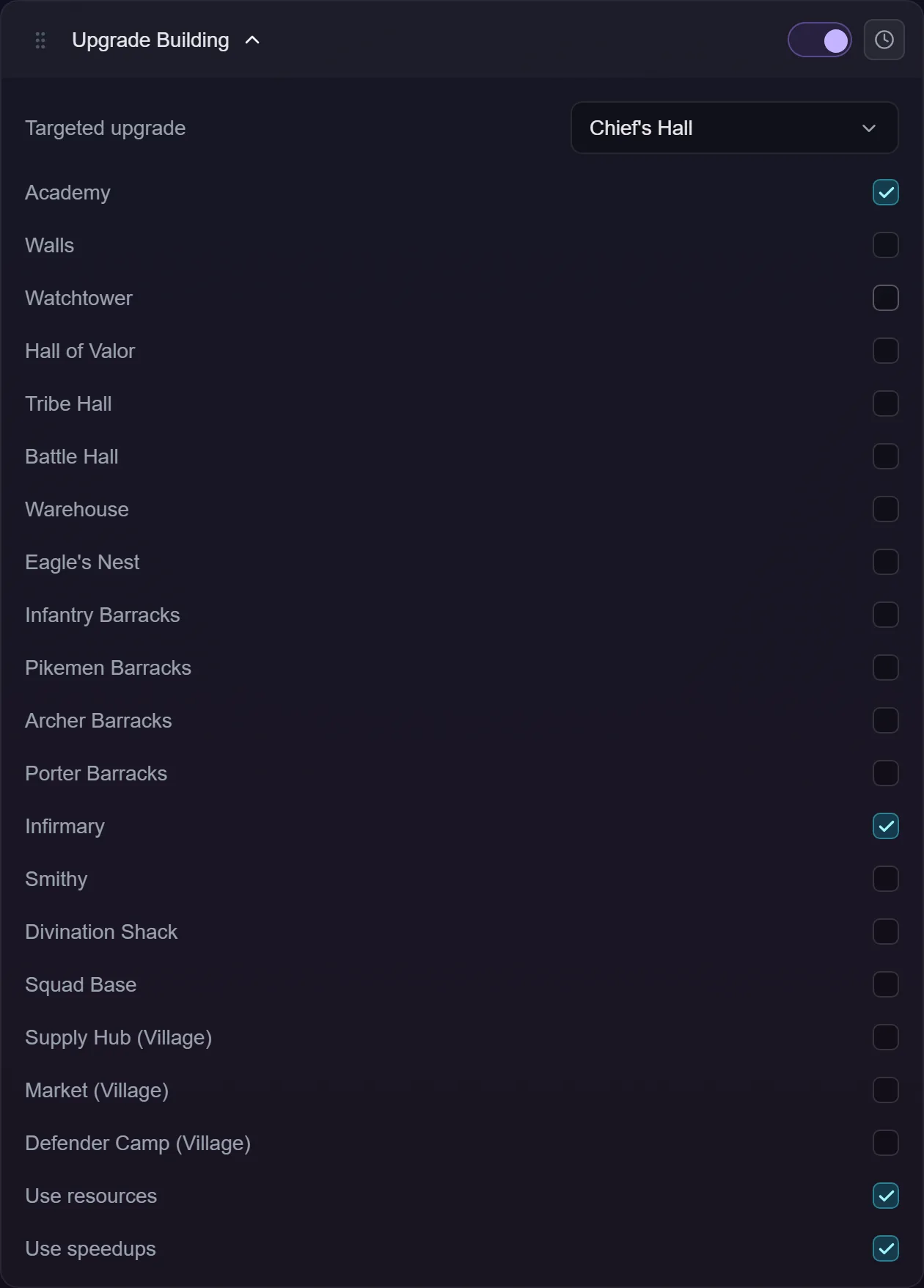
- Pick a Targeted upgrade if you want one — None, Chief's Hall, or Village Hall — or leave it on None.
- Tick any of the other buildings you're happy for the bot to raise.
- Use resources spends resource items from your bag when an upgrade is short. On by default.
- Use speedups spends speed-up items on the timer after an upgrade starts. Off by default.
Order is: the targeted dropdown first, then the ticked buildings top to bottom as they appear in the list. Anything past the first two is ignored for that pass — not queued, not remembered. Next pass starts from the top again.
If you want different buildings prioritised at different times, add a second copy of the action and give it its own schedule.
The Chief's Hall is deliberately separate
The bot will never upgrade the Chief's Hall as a side effect of asking for something else, even when the game names it as the prerequisite. It's usually the most expensive upgrade on the account and it ties up a builder for a long time, so it only ever goes up when you pick it in the dropdown yourself.
When a chain runs into it you'll see a message saying the building needs the Chief's Hall first and that nothing was started. That's the action working as designed.
Village buildings
The Village Hall (in the dropdown) and Supply Hub, Market and Defender Camp (in the checklist) exist once per village — so there are four of each, and one tick covers all four. You don't pick a village.
The bot takes the lowest unlocked one of the four, so your villages level up evenly instead of the strongest running away with it. Ties go to the earliest village. A village you haven't unlocked is never picked, and one that's already upgrading is passed over for the next-lowest that's free — unless all four are busy, in which case it takes the lowest and spends speed-ups there if you asked it to.
Troubleshooting
Nothing starts. Both builders are busy, or everything on your list is already upgrading. Either is a clean end to the pass.
I ticked five buildings and it only does two. That's the two-builder limit. It's a priority list — reorder by unticking what you care about least.
It keeps saying I'm short on resources. Turn on Use resources to let it top up from your bag, or free some up. It only ever spends what the shortfall needs.
It upgraded something I didn't tick. It followed a prerequisite chain from something you did tick. That's how a high-level target still makes progress.
The upgrade window has a strange title. Past a certain level the game titles the Chief's Hall window by the city Power level it will reach — "Upgrade Power to Heyday" — rather than by the building name. It's an ordinary upgrade window and the bot treats it as one.
A worker window opened instead of the upgrade. A builder hadn't been appointed. The bot appoints the workers, closes the window, and starts the upgrade.
It finished several levels instantly. The game offered to complete them for free, and it kept taking that offer until the free finishes ran out. A low-level building can clear several levels this way.