
The BotDaddy Tools screen
Three utilities for fixing things. One of them can be destructive, and it's clearly marked below.
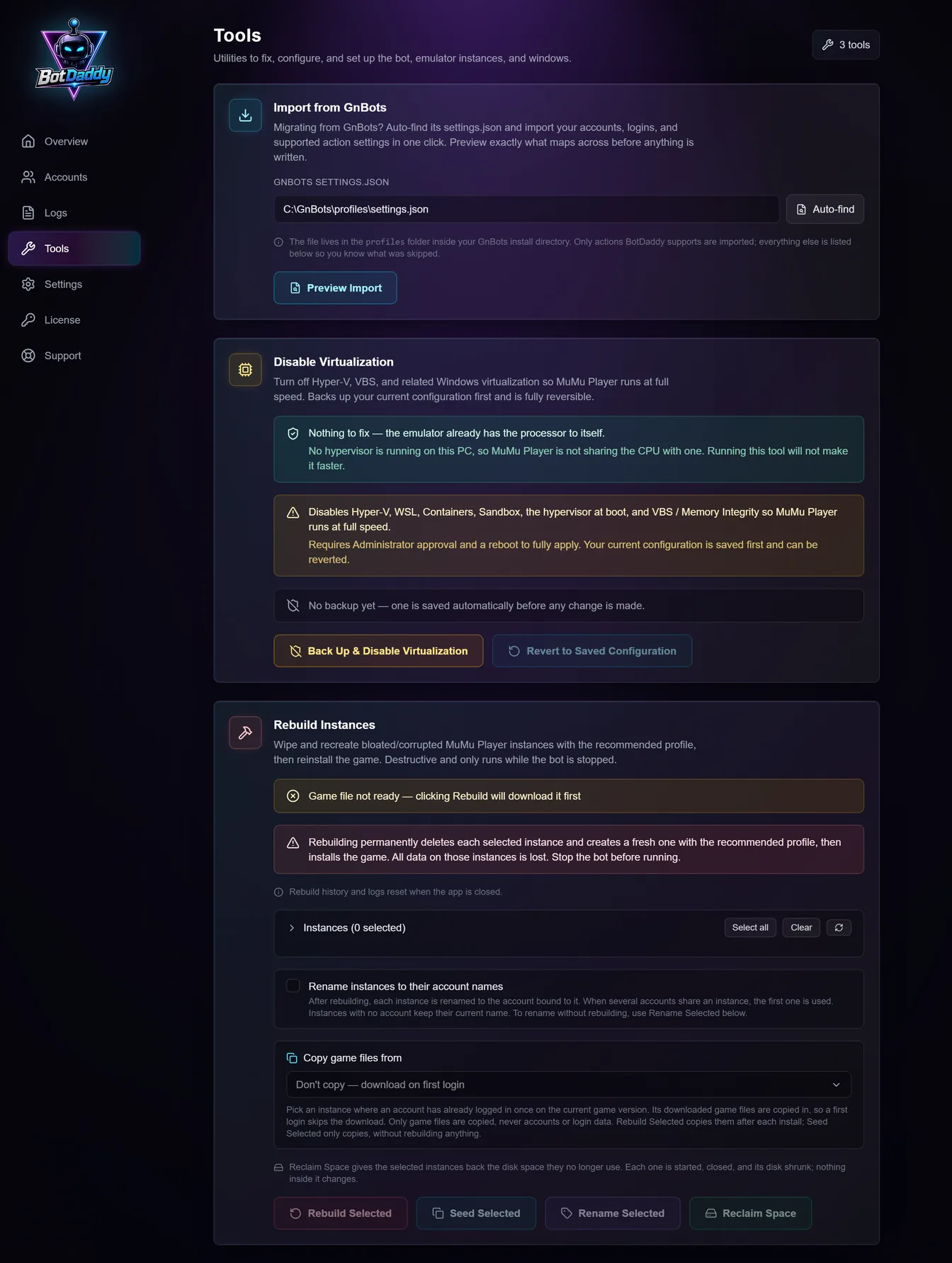
Import from GnBots
Finds your GnBots settings.json and imports the accounts, logins and
supported action settings from it.
Auto-find locates the file for you — it lives in the profiles folder
inside your GnBots install. Preview Import shows exactly what will be
brought across before anything is written, including what's being skipped.
Only actions BotDaddy has an equivalent for are imported; everything else is listed so you can see what didn't come across. Nothing is deleted from GnBots.
Full walkthrough: migrating from GnBots.
Disable Virtualization
Turns off Hyper-V, VBS, Windows Sandbox, WSL, Containers and the boot hypervisor, so your emulator runs at full speed rather than on top of another hypervisor.
It tells you first whether you need it. The top of the card reads what your PC is doing right now: green means no hypervisor is running and the tool would change nothing worth changing, amber names what is currently taking the processor.
It backs up your current configuration first and is fully reversible — "Revert to Saved Configuration" puts everything back. It needs Administrator approval and a reboot to fully apply.
This is the fix for the most common reason LDPlayer won't start at all. If your emulators refuse to launch or run at a crawl, start here — see Hyper-V and virtualization errors.
Rebuild Instances
Four tools in one card, for whichever emulator you've chosen in Settings → Emulator. It only runs while the bot is stopped.
- Rebuild Selected wipes the ticked instances and recreates them with the recommended settings, then installs the game.
- Seed Selected copies the game's first-login files from another instance, so new instances skip the 2 GB download. Pick that instance under Copy game files from; a rebuild can use it too.
- Rename Selected names the ticked instances after their accounts, without rebuilding anything.
- Reclaim Space (MuMu Player only) shrinks the ticked instances' disk files back to what they actually use.
Rebuild Selected is destructive. It permanently deletes each ticked instance and creates a fresh one. Everything on it is lost — including the game's saved login, so the account has to sign in again. Make sure the account's credentials are filled in before you rebuild its instance. The other three buttons delete nothing.
Every button, option and message is covered in the Rebuild Instances guide.
When to rebuild
- The instance has become bloated or corrupted and boots unreliably.
- The instance was created by another bot and isn't set up the way BotDaddy expects.
- The game on it is broken in a way reinstalling from the Accounts screen doesn't fix.
For an out-of-date or missing game, use Update / Install Game on the account row first — that isn't destructive and is usually enough.
Troubleshooting
Rebuild is refused. The bot is running. Stop it first.
The game file isn't downloaded yet. The card says so, and clicking Rebuild downloads it first.
I rebuilt an instance an account was bound to. The binding survives. On LDPlayer the new instance gets a fresh number and the account is moved to it automatically; on MuMu Player the new instance keeps the same number.
LDPlayer renumbered everything. Restarting the app re-reads the list.
Disable Virtualization asked for Administrator. Expected — it's changing Windows features. Approve it, and reboot afterwards.
I closed the app mid-rebuild. The history and logs for that run are lost. Check your emulator's instance list to see where it got to.